

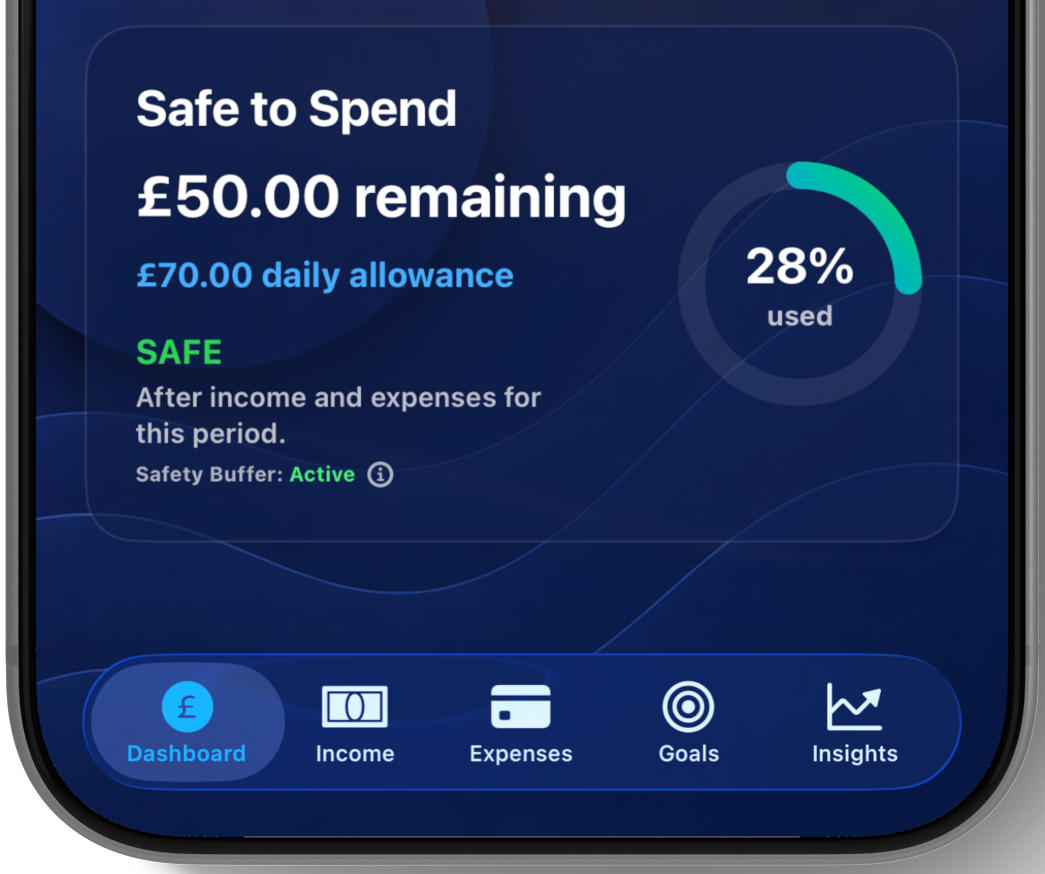
“How much do I have left?” sounds like a balance question. In practice, it is a planning question.
Imagine an account showing £1,000. Part of that money may already be needed for rent, an annual insurance payment or several smaller bills due before the next income arrives. Some may be deliberately kept aside for unexpected costs. The displayed balance is accurate, but treating all of it as available spending money would ignore those commitments.
The figures above are illustrative only. They are not a recommended budget or a calculation of a Safe to Spend amount.
What changes the amount available?
How Safe to Spend approaches the problem
In SiBalance, Safe to Spend begins with the remaining budget balance, reserves any active safety buffer, and spreads the available amount across the remaining time in the budget period. Depending on the saved budget, the calculation can include available balance, future income, future expenses and recurring transactions.
That is deliberately more useful than treating the current balance as a spending target. The result is shown as an allowance for a chosen window, so it can answer a narrower question such as “what is available this week?” or a broader one such as “what is available for the rest of this budget period?”
The chosen window matters
Safe to Spend can be displayed daily, weekly, fortnightly, monthly, yearly or for the remainder of the current budget period using Match Period. The setting belongs to each budget, so separate budgets can use different windows.
Committed costs and everyday spending behave differently
A repeating expense is treated as committed spending. It still reduces the balance and the relevant daily, weekly, monthly or yearly allowance, but it does not count as everyday spending against the Safe to Spend ring.
For a one-off expense, SiBalance includes a Deduct from Safe to Spend choice. Leave it on for everyday purchases that should reduce the current allowance. Turn it off for a planned one-off commitment that should reduce the balance without being treated as discretionary spending against the ring.
This distinction avoids making the same committed bill look like both money reserved in the plan and an unexpected use of the everyday allowance.
The recurring expenses guide explores how to organise regular and less frequent commitments before they become a surprise.
What a safety buffer does
A safety buffer reserves part of the current balance before Safe to Spend is calculated. It does not record an expense and does not change the displayed balance. It simply keeps the selected amount outside the available-spending allowance.
The appropriate buffer is personal to the budget. SiBalance offers no buffer, suggested amounts in the selected currency, or a custom amount. The app does not decide what somebody ought to reserve.
The result is only as current as the budget
Safe to Spend depends on the information entered into the budget. If an expense is missing, an expected payment changes, or a transaction is recorded late, the displayed allowance may not reflect the latest situation.
Manual entry makes that dependency visible. A short review of upcoming commitments and recent spending keeps the estimate grounded in the information the user actually knows.
- Record income and expenses with accurate dates.
- Keep repeating commitments current when bills change.
- Choose a Safe to Spend window that matches the decision being made.
- Review the safety buffer when circumstances change.
- Check the underlying entries when an allowance looks unexpected.
What Safe to Spend cannot know
Safe to Spend is a budgeting estimate based on user-provided information. It cannot anticipate an unrecorded bill, guarantee that a future payment will arrive, prevent overspending or account for every unexpected event.
A planning aid, not financial advice
The result is intended to make a personal budget easier to understand. It should not be treated as financial, investment, accounting, tax or other professional advice. The user remains responsible for spending decisions and for keeping the budget information accurate.
Safe to Spend is included
SiBalance includes unlimited budgets, income and expense tracking, recurring entries, upcoming payments and Safe to Spend in any of 159 supported currencies. Siri and App Intents can also open Safe to Spend or add transactions.
Widgets reflect the Safe to Spend window selected for each budget. SiBalance also includes iCloud Sync, encrypted backups, Goals, forecasting, Insights and trends, Themes, screenshot import, and CSV import and export.
See the plan behind the balance.
Get started with Safe to Spend and one complete budget for free. Unlock SiBalance Full once for the complete feature set. No bank connection, account or subscription is required.